There is a setting in every Sponsored Products campaign called adjust bids by placement. Amazon gives you three: top of search, rest of search, and product pages. Each one takes a percentage.
The percentage only goes up. Amazon’s own wording is that you can adjust a placement by up to 900%.
There is no minus. 0% does not mean off, it means no increase. So the one placement decision most sellers actually want to make is the one the interface will not let them make.
Here is what that costs on a real account.
One campaign, two placements
This is a Grocery and Gourmet Food brand we run ads for, pulled from the placement report, exact match campaigns only, June 16 to September 13.
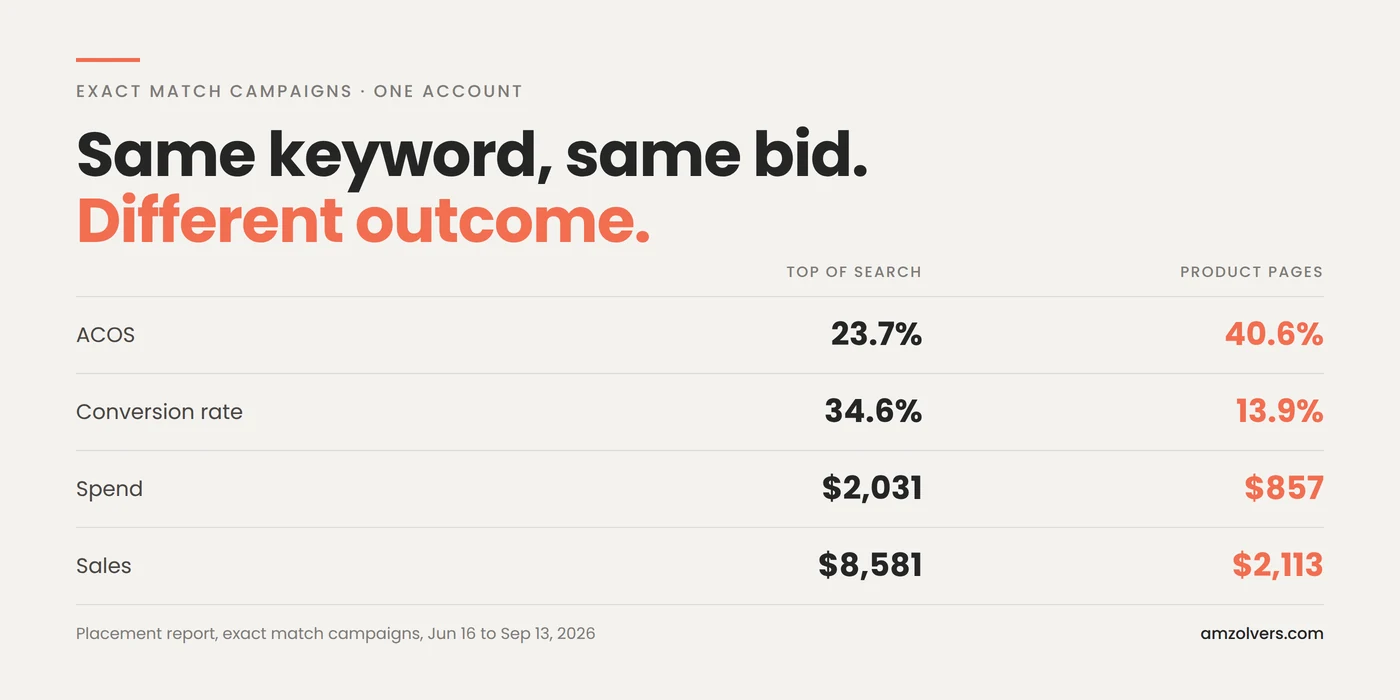
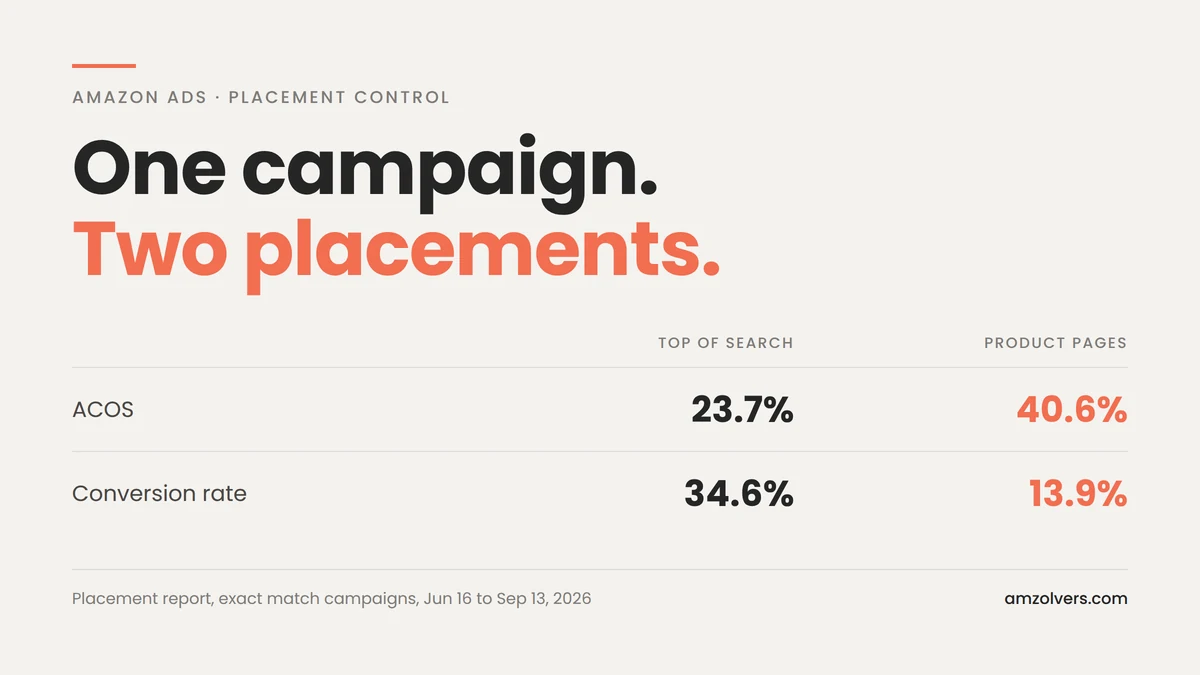
Top of search returned a 23.7% ACOS at a 34.6% conversion rate. Product pages returned 40.6% at 13.9%.
Same keyword. Same bid. Same product. Same day. The only variable is where the ad appeared.
That gap is not a bidding problem and it is not a listing problem. It is an intent problem, and it is baked into what the placement is.
The shopper on a detail page never typed your keyword
The volume is where this gets uncomfortable.
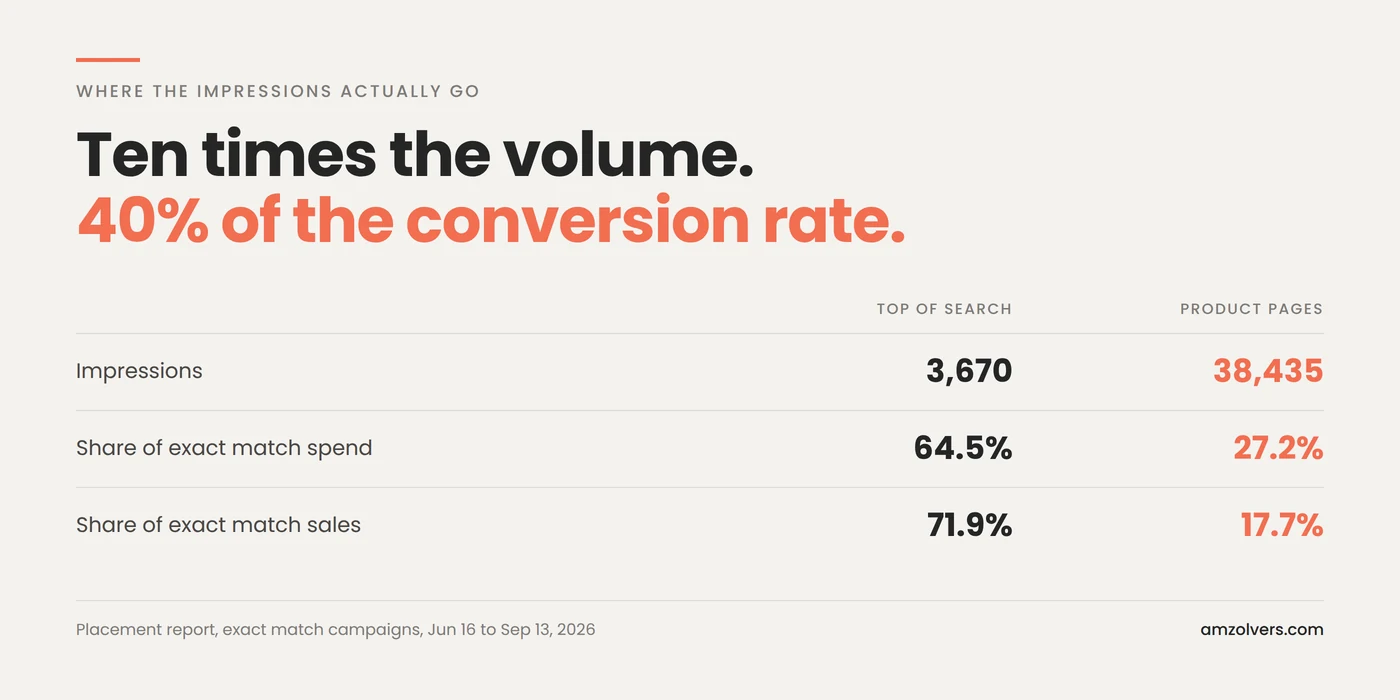
Top of search served 3,670 impressions in that window. Product pages served 38,435. Ten times the volume at 40% of the conversion rate.
The reason is structural. When you build an exact match campaign you are telling Amazon the precise phrase you want to pay for. That instruction is the entire product. The product pages placement then takes your ad and puts it in a carousel on somebody else’s detail page, in front of a shopper who typed nothing at all, and charges you against the same keyword bid.
Amazon picks that page contextually. Sometimes it is a near competitor and the placement earns its money. Often it is an adjacent product where your listing reads as an interruption, which is what a 13.9% conversion rate on ten times the traffic looks like.
Across those campaigns the placement took 27% of exact match spend and gave back 18% of the sales.
Why you cannot just bid down
The obvious answer is to lower the bid until product pages stops winning auctions. It does not work, and the reason is worth understanding before you try it.
Sponsored Products has one bid per keyword. The placement modifier sits on top of that bid. So the only lever that reaches product pages is the base bid, and the base bid is also what makes you competitive at top of search. Pull it down far enough to starve the placement costing you 40% ACOS and you also walk away from the placement returning 23.7%.
Down-only dynamic bidding has the same shape. It reduces bids where a conversion looks unlikely, across the board, on Amazon’s read of the auction rather than yours. It is a discount, not a switch.
You end up managing the placement you want by damaging the placement you want to keep.
Walmart has the switch
Walmart Connect treats this as a campaign setting rather than a bid problem.
In Walmart’s advertising documentation a campaign carries a list of placements, and each placement carries a status: included or excluded. Item Buybox is one of the placement names their docs give. You decide where the budget is allowed to go, and the bid stays free to do its job in the places you kept.
That is the whole ask. Not a new ad type, not more reporting, not another beta. A minus sign on a lever that already exists.
Negative ASIN targeting is not the workaround
This is the answer that usually comes back, so it is worth closing off.
Negative product targeting blocks specific ASINs. That means it blocks the detail pages you have already found in a report, after you have already paid to learn they do not convert. The catalogue keeps producing new ones, the placement keeps serving on them, and you are permanently one report behind.
It is a cleanup tool. It is not placement control, and running it as though it were is how accounts end up with a negative list hundreds of ASINs long that never quite fixes the ACOS.
What to check this week
Open the placement report rather than the campaign view, filter to your exact match campaigns, and put the two ACOS numbers side by side. Then look at the impression counts next to them.
If product pages is taking a quarter of your exact match spend and returning less than a fifth of the sales, that is not an optimisation you have been neglecting. There is currently no setting that fixes it, and the first step is knowing the size of what you cannot switch off.
We run this report monthly on every account we manage. It is the cheapest fifteen minutes in an Amazon ad account, and almost nobody spends them.